LibreOffice announced a document-opening Java code-execution flaw on October 5. A fix is available. OpenOffice recommends an interim setting change for the related flaw.
Imagine a hypothetical office where a weekly results spreadsheet arrives shortly before a meeting. Someone who only wants to check one number must decide whether to open it immediately or ask the person responsible first. This illustrates an everyday setting for reading security advice; it is not a reported victim’s experience.
What can happen when a file opens?
Calc documents can request components to fetch external data. LibreOffice says opening a crafted document in vulnerable software can run remote Java code.
Thinking of a document only as a container of numbers can obscure what software does while opening it. Java is a software runtime that executes programs. It is distinct from the similarly named JavaScript.
A description of risk when opening a document does not establish infection from receiving a file. A warning about crafted documents cannot diagnose every document as infected. These materials cannot determine whether an individual recipient has been compromised.
First identify your product and current version
The first practical step is to identify which product and version you use. Installing a fix and disabling an integration are different workplace decisions. One requires preparing an installation; the other requires considering whether that connection supports everyday work.
Following the advisories
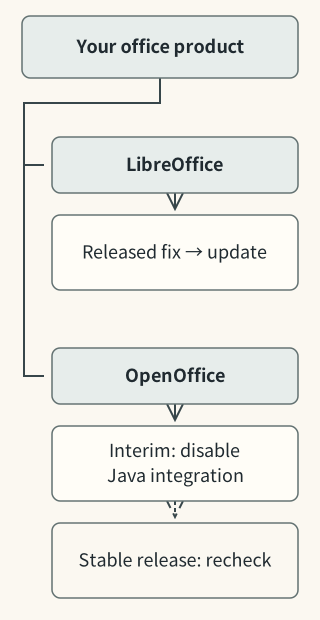
LibreOffice recommends updating to the fixed versions 26.2.5 or 26.8.0 or later for CVE-2026-63277. Its official download page offers 26.8.0. These version thresholds guide the response to this flaw; they cannot be read as an assurance against every security problem.
CVE-2026-59265 affects OpenOffice 4.1.16 and older. The advisory’s 4.1.17 is a release candidate, not a released stable fix. The official download-page header advertises 4.1.16.
OpenOffice recommends unticking “Use a Java runtime environment” as interim prevention. On Windows/Linux, use Tools → Options → OpenOffice → Java; on macOS, use OpenOffice → Preferences → OpenOffice → Java.
Disabling an integration and uninstalling its runtime are different actions. If a function depends on Java, disabling the connection may affect that workflow. On an institutionally managed PC, coordinate changes through the approved update and settings process. This reporting has not tested which specific workflows would be affected.
Two response paths
V: What would make the next development useful
A fix and temporarily disabling a feature are different responses. V argues that changing a security setting alone is insufficient to judge success. If work depends on Java, the response should also establish an approved way to continue that work and conditions for reviewing the interim measure.
When OpenOffice’s stable fix arrives, check that it explicitly addresses this CVE and has a stable download. Checking necessary workflows through approved procedures would then provide a basis for deciding whether to retain the interim setting or move to an update-led response.